

DataLayer collector
The DataLayer collector gathers ecommerce data by listening to standard GA4 events on the dataLayer object. If you already send GA4 ecommerce events to Google Analytics, the collector can reuse them with no extra work. If not, this guide walks you through the events to add and shows the required fields for each one.
You can send events in two equivalent ways:
| Method | Example |
|---|---|
| gtag | gtag("event", "view_item_list", { ... }) |
| dataLayer.push | window.dataLayer.push({ event: "view_item_list", ... }) |
Getting started
Section titled “Getting started”Add the LBX script inside the <head> element of every page so it can listen for events as the page loads:
<script async src="https://scripts.luigisbox.tech/LBX-XXXXXX.js"></script>Event parameters
Section titled “Event parameters”Use this table as a quick glossary of the fields used across the ecommerce events on this page. Not every parameter applies to every event — each event section specifies exactly which fields are required.
| Parameter | Description |
|---|---|
event | Name of the event. Supported values: view_item_list, view_item, select_item, add_to_cart, purchase |
item_list_name | Identifier of the list being reported. Supported values: Autocomplete, Search Results, Product Listing, Recommendation |
search_term | Query entered by the user. Required for Search Results and Autocomplete events. |
items | Array of item objects representing the results or products involved in the event. |
item_id | Identity of the item. Must match the identity used in your catalog. |
item_name | The display name/title of the item. |
index | Position of the item in the list. Note: When using pagination, offset by the number of items on previous pages. |
type | Content type of the item. Supported values: item (default), category, brand, article |
price | Price of the item. For purchase events, this is the price of a single unit. |
quantity | Number of units. Used only in purchase events. |
filters | Object of filter names and their values. When a filter has multiple values, pass them as an array. You can also use these reserved keys: _Guid (unique identifier of the API response), _Variant (A/B test variant identifier for the list). |
transaction_id | Unique identifier of the transaction. |
value | Total monetary value of the event. |
currency | 3-letter ISO 4217 currency code (e.g., EUR, USD). |
Quick reference
Section titled “Quick reference”Start here if you want the shortest path to a working integration. The table below shows which events to implement for each feature — click an event name to jump to its example.
| Event | GA4 name | When to fire |
|---|---|---|
| Autocomplete | view_item_list | User sees autocomplete suggestions |
| Search results | view_item_list | Search results page loads |
| Product listing | view_item_list | Category / Brand listing page loads |
| Recommendations | view_item_list | Recommendation widget renders |
| No results | view_item_list | Search returns zero results |
| Click | select_item | User clicks a result |
| Add to cart | add_to_cart | User adds an item to cart |
| Transaction | purchase | User completes a purchase |
| Impression | view_item | User visits a product detail page |
The examples below show the minimum required parameters. If you already collect additional GA4 fields, you can include them as well.
Each event section includes: required fields, plus a tabbed example for dataLayer.push and gtag.
Autocomplete
Section titled “Autocomplete”Send a view_item_list event when autocomplete suggestions are displayed.
| Field | Required | Description |
|---|---|---|
item_list_name | Yes | Set to "Autocomplete". |
search_term | Yes | Query entered by the user. |
items[] | Yes | Array of result objects. Each item includes: item_id (item identity), item_name (display name/title), index (position in the list), price (item price, optional), type (content type, e.g. item, category, brand — defaults to item) |
filters | Active filters applied to the results. You can also send: _Guid (guid from the Autocomplete API response), _Variant (A/B test variant identifier) |
window.dataLayer.push({ event: "view_item_list", ecommerce: { item_list_name: "Autocomplete", search_term: "phone", items: [ { item_id: "CAT_12345", item_name: "Phones", index: 1, type: "category", // Define a result type. If left empty, fallbacks to "item". }, { item_id: "SKU_12345", item_name: "Stan and Friends Tee", index: 2, // If pagination is used, offset the index by the number of items before the current page. price: 9.99, }, { item_id: "SKU_12346", item_name: "Google Grey Women's Tee", index: 3, price: 20.99, type: "item", } ], filters: { "_Guid": "a1b2c3d4-e5f6-7890-abcd-ef1234567890", // Autocomplete API response guid "_Variant": "Original", // A/B test variant (optional) "Color": ["Black", "Silver"], "Operating system": "Android" } },});gtag("event", "view_item_list", { item_list_id: "autocomplete", item_list_name: "Autocomplete", search_term: "Phone", items: [ { item_id: "CAT_12345", item_name: "Phones", index: 1, type: "category", // Define a result type. If left empty, fallbacks to "item". }, { item_id: "SKU_12345", item_name: "Stan and Friends Tee", index: 2, // If pagination is used, offset the index by the number of items before the current page. price: 9.99, type: "item", }, { item_id: "SKU_12346", item_name: "Google Grey Women's Tee", index: 3, price: 20.99, type: "item", } ], filters: { "_Guid": "a1b2c3d4-e5f6-7890-abcd-ef1234567890", // Autocomplete API response guid "_Variant": "Original", // A/B test variant (optional) "Color": ["Black", "Silver"], "Operating system": "Android" }});Search results
Section titled “Search results”Send a view_item_list event when the search results list is displayed. The structure is identical to Autocomplete, except item_list_name is "Search Results".
| Field | Required | Description |
|---|---|---|
item_list_name | Yes | Set to "Search Results". |
search_term | Yes | Query entered by the user. |
items[] | Yes | Array of result objects. Each item includes: item_id (item identity), item_name (display name/title), index (position in the list), price (item price, optional), type (content type, e.g. item, category — defaults to item) |
filters | Active filters applied to the results. You can also send: _Guid (guid from the Search API response), _Variant (A/B test variant identifier) |
window.dataLayer.push({ event: "view_item_list", ecommerce: { item_list_name: "Search Results", search_term: "Phone", items: [ { item_id: "CAT_12345", item_name: "Phones", index: 1, type: "category", // Define a result type. If left empty, fallbacks to "item". }, { item_id: "SKU_12345", item_name: "Stan and Friends Tee", index: 2, // If pagination is used, offset the index by the number of items before the current page. price: 9.99, type: "item", }, { item_id: "SKU_12346", item_name: "Google Grey Women's Tee", index: 3, price: 20.99, type: "item", } ], filters: { "_Guid": "a1b2c3d4-e5f6-7890-abcd-ef1234567890", // Search API response guid "_Variant": "Original", // A/B test variant (optional) "Color": ["Black", "Silver"], "Operating system": "Android" } }});gtag("event", "view_item_list", { item_list_name: "Search Results", search_term: "Phone", items: [ { item_id: "CAT_12345", item_name: "Phones", index: 1, type: "category", // Define a result type. If left empty, fallbacks to "item". }, { item_id: "SKU_12345", item_name: "Stan and Friends Tee", index: 2, // If pagination is used, offset the index by the number of items before the current page. price: 9.99, type: "item", }, { item_id: "SKU_12346", item_name: "Google Grey Women's Tee", index: 3, price: 20.99, type: "item", } ], filters: { "_Guid": "a1b2c3d4-e5f6-7890-abcd-ef1234567890", // Search API response guid "_Variant": "Original", // A/B test variant (optional) "Color": ["Black", "Silver"], "Operating system": "Android" }});Product listing
Section titled “Product listing”Send a view_item_list event when a category or listing page displays a product list.
| Field | Required | Description |
|---|---|---|
item_list_name | Yes | Set to "Product Listing". |
items[] | Yes | Array of product objects. Each item includes: item_id (item identity), item_name (display name/title), index (position in the list), price (item price), type (content type, typically item) |
scopes | Yes | Object identifying the current category: CategoryLabel (human-readable category path, levels separated by pipe, e.g. Electronics | Phones | Black Phones), CategoryIdentity (category identifier matching the identity in your catalog). |
filters | Additional filters selected by the user. You can also send: _Guid (guid from the Search API response), _Variant (A/B test variant identifier) |
window.dataLayer.push({ event: "view_item_list", ecommerce: { item_list_name: "Product Listing", items: [ { item_id: "SKU_12345", item_name: "Black phone 256gb", index: 1, // If pagination is used, offset the index by the number of items before the current page. price: 9.99, type: "item", }, { item_id: "SKU_12346", item_name: "Black phone 128gb", index: 2, price: 20.99, type: "item", } ], scopes: { "CategoryLabel": "Electronics | Phones | Black Phones", "CategoryIdentity": "12345", }, filters: { "_Guid": "a1b2c3d4-e5f6-7890-abcd-ef1234567890", // Search API response guid "_Variant": "Original", // A/B test variant (optional) "Operating system": "Android" // Pass additional filters selected by the user } }});gtag("event", "view_item_list", { item_list_name: "Product Listing", items: [ { item_id: "SKU_12345", item_name: "Black phone 256gb", index: 1, price: 9.99, type: "item", }, { item_id: "SKU_12346", item_name: "Black phone 128gb", index: 2, price: 20.99, type: "item", } ], scopes: { "CategoryLabel": "Electronics | Phones | Black Phones", "CategoryIdentity": "12345", }, filters: { "_Guid": "a1b2c3d4-e5f6-7890-abcd-ef1234567890", // Search API response guid "_Variant": "Original", // A/B test variant (optional) "Operating system": "Android" // Pass additional filters selected by the user }});Recommendations
Section titled “Recommendations”Send a view_item_list event when a recommendation widget displays items.
| Field | Required | Description |
|---|---|---|
item_list_name | Yes | Set to "Recommendation". |
items[] | Yes | Array of recommended item objects. Each item includes: item_id (item identity), item_name (display name/title), index (position in the list), price (item price), type (content type, typically item) |
filters | Yes | Recommendation metadata passed as filter keys: RecommenderClientId (unique identifier of the recommender), RecommendationId (unique identifier of the recommendation set), ItemIds (input items from the recommendation request), Recommender (name of the recommender), Type (type of the recommender), _Variant (A/B test variant identifier). |
window.dataLayer.push({ event: "view_item_list", ecommerce: { item_list_name: "Recommendation", items: [ { item_id: "SKU_12345", item_name: "Stan and Friends Tee", index: 1, price: 9.99, type: "item", }, { item_id: "SKU_12346", item_name: "Google Grey Women's Tee", index: 2, price: 20.99, type: "item", } ], filters: { "RecommenderClientId": "Basket", "ItemIds": ["/products/123", "/products/129"], "Type": "basket", "RecommendationId": "1abc2de3-f456-7890-1g23-hijk45l6789m", "_Variant": "Luigis", } }});gtag("event", "view_item_list", { item_list_name: "Recommendation", items: [ { item_id: "SKU_12345", item_name: "Stan and Friends Tee", index: 1, price: 9.99, type: "item", }, { item_id: "SKU_12346", item_name: "Google Grey Women's Tee", index: 2, price: 20.99, type: "item", } ], filters: { "RecommenderClientId": "Basket", "ItemIds": ["/products/123", "/products/129"], "Type": "basket", "RecommendationId": "1abc2de3-f456-7890-1g23-hijk45l6789m", "_Variant": "Luigis", }});No results
Section titled “No results”Send the event even when a search returns no results so Luigi’s Box can track zero-result queries. Set items to an empty array.
| Field | Required | Description |
|---|---|---|
item_list_name | Yes | Set to "Search Results" or "Autocomplete" depending on the context. |
search_term | Yes | Query that returned no results. |
items | Yes | Set to an empty array: []. |
filters | Active filters applied at the time of the search. |
window.dataLayer.push({ event: "view_item_list", ecommerce: { item_list_name: "Search Results", search_term: "Phone", items: [], filters: { "Color": ["Burgundy"], "Operating system": "Android" } }});gtag("event", "view_item_list", { item_list_name: "Search Results", search_term: "Phone", items: [], filters: { "Color": "Yellow" }});Send a select_item event when a user clicks a result from any list (search, autocomplete, recommendations, or product listing).
| Field | Required | Description |
|---|---|---|
items[] | Yes | Array containing a single item object: item_id (identity of the clicked item) |
window.dataLayer.push({ event: "select_item", ecommerce: { items: [ { item_id: "SKU_12345", } ] }});gtag("event", "select_item", { items: [ { item_id: "SKU_12345", } ]});Add to cart
Section titled “Add to cart”Send an add_to_cart event when a user adds an item to their cart.
| Field | Required | Description |
|---|---|---|
currency | Yes | 3-letter ISO 4217 currency code (e.g., EUR). |
value | Yes | Monetary value of the item being added. |
items[] | Yes | Array containing a single item object: item_id (identity of the item being added) |
window.dataLayer.push({ event: "add_to_cart", ecommerce: { currency: "EUR", value: 7.77, items: [ { item_id: "SKU_12345", } ] }});gtag("event", "add_to_cart", { currency: "EUR", value: 7.77, items: [ { item_id: "SKU_12345", } ]});Transaction
Section titled “Transaction”Send a purchase event after the purchase is confirmed.
| Field | Required | Description |
|---|---|---|
transaction_id | Yes | Unique identifier of the transaction. |
value | Yes | Total monetary value. Sum of (price x quantity) for all items. |
currency | Yes | 3-letter ISO 4217 currency code (e.g., EUR). |
items[] | Yes | Array of purchased item objects. Each item includes: item_id (item identity), item_name (display name/title), index (position in the list), price (price of a single unit, not the line total), quantity (number of units purchased) |
window.dataLayer.push({ event: "purchase", ecommerce: { transaction_id: "T_12345", // Sum of (price * quantity) for all items value: 72.05, currency: "EUR", items: [ { item_id: "SKU_12345", item_name: "Stan and Friends Tee", index: 0, // Price of a single unit of an item (not the total price) price: 10.01, quantity: 3 }, { item_id: "SKU_12346", item_name: "Grey Women's Tee", index: 1, // Price of a single unit of an item (not the total price) price: 21.01, quantity: 2 } ] }});gtag("event", "purchase", { transaction_id: "T_12345", value: 30.98, currency: "EUR", items: [ { item_id: "SKU_12345", item_name: "Stan and Friends Tee", index: 0, price: 9.99, quantity: 1 }, { item_id: "SKU_12346", item_name: "Google Grey Women's Tee", index: 1, price: 20.99, quantity: 1 } ]});Impression
Section titled “Impression”Send a view_item event when a user visits a product detail page.
| Field | Required | Description |
|---|---|---|
items[] | Yes | Array containing a single item object: item_id (identity of the viewed product) |
window.dataLayer.push({ event: "view_item", ecommerce: { items: [ { item_id: "SKU_12345", } ] }});gtag("event", "view_item", { items: [ { item_id: "SKU_12345", } ]});User identifiers
Section titled “User identifiers”By default, Luigi’s Box identifies visitors using a unique ID stored in the _lb cookie.
If you have a stable customer identifier (for example, a logged-in user ID), you can send it to:
- Recognize the same user across devices and sessions.
- Enable personalization in backend-only integrations (for example, Search as a Service or server-side recommendations), even before the
_lbcookie is available.
Send your identifier by pushing a luigisbox.collector.customer_id event:
dataLayer.push
window.dataLayer.push({ event: 'luigisbox.collector.customer_id', customer_id: "12345", // Replace with the actual ID});If this event is not sent, Luigi’s Box falls back to the automatic _lb cookie identifier.
Troubleshooting
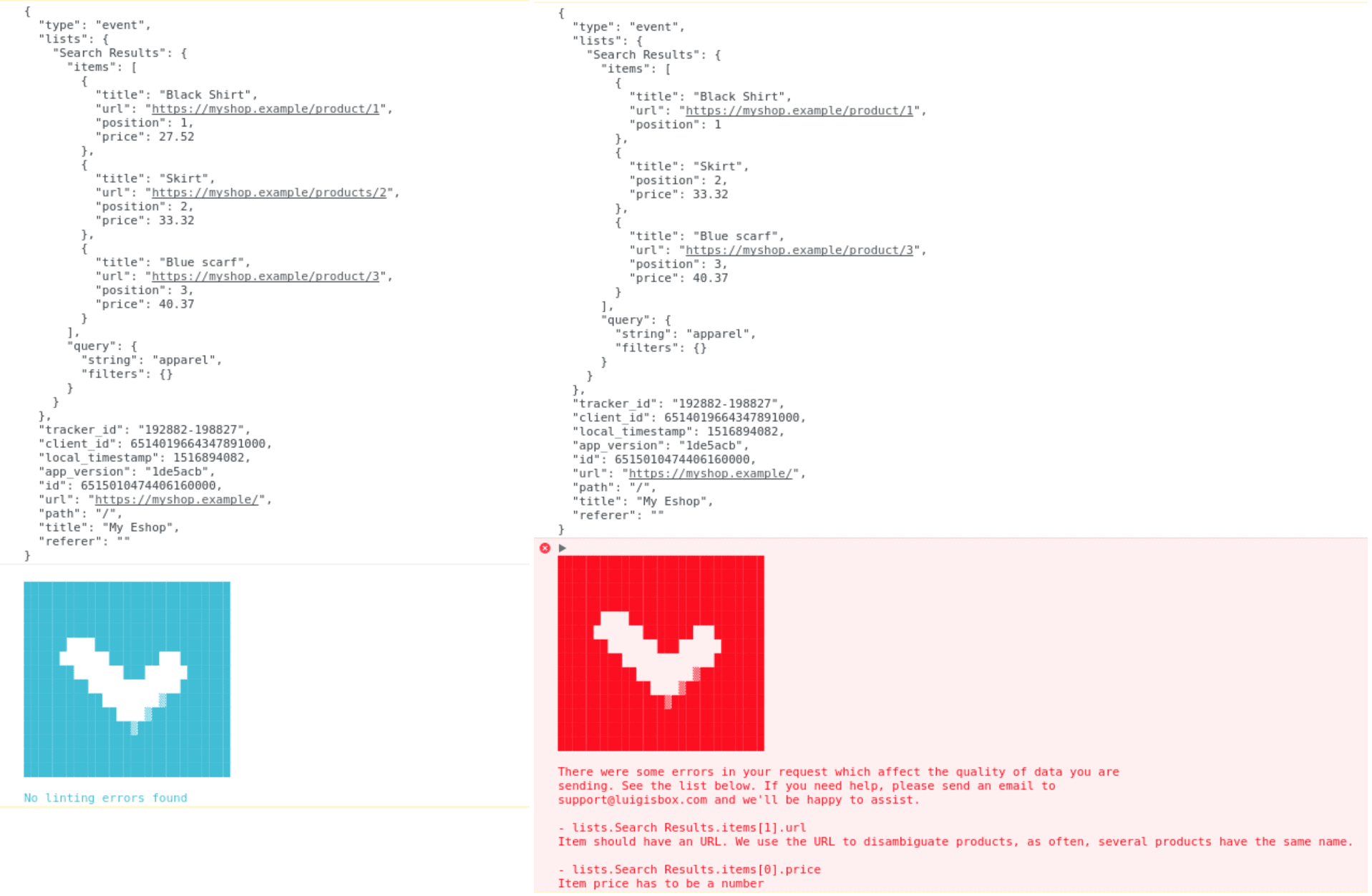
Section titled “Troubleshooting”While integrating, enable the built-in data linter to validate your events in the browser console:
- Make sure the Luigi’s Box script is included on the page.
- Open your browser’s developer console (press F12).
- In the Console tab, run:
Luigis.lint = true - Reload the page (keep the console open).
Each time the collector processes an event, it prints a report in the console:
- Blue logo — data looks correct, no issues found.
- Red logo — problems detected; review the listed errors.
If you don’t see any linter output, you may be running an older version of the integration script. Contact us and we’ll upgrade it for you.
To disable the linter, run: Luigis.lint = false
Was this page helpful?
Thanks.